Powered By Blogger

Thursday, 8 March 2012

Unit 1 pre-production techniques for the creative media industries

In  this essay , there  are  information  about  what  codes of practice and regulations related to the media industry is  and  what is  the  process  of filming  it  is . There is information on the pre production process and time management techniques in filming. I have added points on about the budget and the how the money is used. There is information on what will happen when the deadlines have not met and all the process of pre production in film.
Deadline is the most important part of filming; this is because you would need to have a goal to aim at so the dates of the film deadlines are the aim for the cast and crew. The deadlines are important when you are pitching you film to the company which is going to give you funding to make this film. They need to know when you are planning to start filming, when you will finish filming and all the dates you will be filming and editing. If you do not finish on the deadline, you will go over your budget, because as much time you use the more money you will waste and this is not good news for the company which has given you the funding to finish the project on time. The company may cut some of them money which has been given as the time management is not good.

The director would need to make a Production Schedule before they start filming. Then once that’s done, the director would need to go with the dates on the production schedule. This helps them to know what days they are filming on not filming. This would be the method that helps keep the timing on time. There is the list of crew there are in the film, the cast and the final deadline of the film so that they know when the film needs to be finish. Sometimes the film needs to be rescheduling as if they is a problem with the cast or a problem with the equipment. See the final deadline will remind the director that they do not have time and that the reschedule date needs to be in a short period of time. What is not good about the production schedule is, if there is any rescheduling, there will be no space to write them down or change dates. You will only know what you are doing each day. Sometimes the dates might not be working as one of the scenes might be longer then they though about it. Here’s and example of a production schedule for a student filming project:

Production schedule
Production: homeless life

Start date : Wednesday  26 January 2011

Final deadline : Wednesday 11 May 2011
Crew:
Director : Sinem Kent
Editor : Neron Turner Power
Camera assistants: Ellee Ford, Shanay Sawyers and Rukshana Khatun
Location manager: Ellee Ford and Shanay Sawyers
Production Admin: Sinem Kent
               Neron Turner Power
                                   Ellee Ford
       Shanay Sawyers
Cast :
Teacher : Tassia kobylinska
Mother : Lucy Cavalier
Daughter:  Rachael
Date
Action
Personnel
 Wednesday 26 January

Production meeting :
Talking about the production roles, action plan, casting and script/ script locations
Sinem Kent , Neron Turner Power, Ellee Ford, Shanay Sawyers , Rukshana Khatun
Wednesday 2 February

Production meeting, taking about the logo, taking about production schedule, dates of filming.
Sinem Kent , Neron Turner Power, Ellee Ford, Shanay Sawyers , Rukshana Khatun
Wednesday 9 February

Production meeting :
Paper work all printed out and put in to the folder. Going to the drama department and putting up posters for actress
Sinem Kent , Neron Turner Power, Ellee Ford, Shanay Sawyers , Rukshana Khatun
Another common method which is Gantt chart. Then, what is a Gantt chart? A Gantt chart is a type of bar chart that illustrates a project schedule. Gantt charts illustrate the start and finish dates of the terminal elements and summary elements of a project. Terminal elements and summary elements comprise the work breakdown structure of the project. Some Gantt charts also show the dependency (i.e., precedence network) relationships between activities. Gantt charts can be used to show current schedule status using percent-complete shadings and a vertical "TODAY" line as shown here.
Here is an example of a Gantt chart:

Gantt charts are useful because you see the week you have got, what has not been done and what needs to be done by that date. Gantt charts are not often used the film but sometimes is used to make things care on what is done and not done or if the film production is longer then 3 months. The Gantt chart is shown to the company who has given the fund so that they know where the film is at and see if more money has been used because of the timescale and not meeting the deadline. What I like about the Gantt chart is that you can see what the steps are to end the film. You can see who you need to work with and in what period of time. It will even help you one your budget as you will know who you need in what weeks and who you will not so you do not over pay people as you might not need them. The bad thing about the Gantt chart is, it does not show you what you need to do each day. No dates on it, only the date of when it’s going to start and when it ends to end so the film and move on to the next thing.

The equipment is the main thing on the filming list. The budget gets in here, because to rent the camera and lighting you will need to pay. When you do the production schedule, you will add the days you will be filming and for those days you will need to rent all the equipment or get it all ready to go. If you do not get the equipment ready for the filming day, the filming will be cancelled and all the money will be pointless as all the crew and cast would be ready. The camera is the main thing because without the camera there is not film. As the cameras are really expensive, the director would need to rent them. Once you get the camera you will be charged for the camera. Lighting is something you will need with the camera. No light no filming. The lighting equipment is heavy as well so moving it a lot around will be difficult. You will again rent the lighting equipment as well. The pay will start to charge as soon as you have got the lighting equipment. Costumes is something which needs to be done before the dates for filming is organized because if you do not have the right costumes then the story you are telling is pointless. Costumes are something the costume manager will need to organize. Find the places they can get the costumes or the fabric to make them. If some costume needs to be made, it will need to be make in the pre production time, once the film company gave the fund to start the filming.  Yet again if the costume is not ready on time, the whole filming dates will claps. The timing and dates are important because all of the equipment used in filming do cost and if you are not organized with the dates and times you may waste a lot of money and this will not make the funder happy.

Transport is the main cost in the whole filming industry. On the film there will be locations where you would need to film. The researches will found places which looks the same in storyboard. Once that’s done you would need to rent a tour bus so you can take all of your crew and cast to the location. The tour bus is money as well; they might not be available as well. So the researches need to found a tour bus company which is available on the date you will be travelling and the date you will be heading back.  This will take about 1 day to found the available tour bus. Once that’s done, when the day comes the whole crew and cast will go to the location of the scene.

The crew and cast. All of these people get paid as well. On the production schedule you will write down the people you need and for what days. The Gantt chart is the same. To get all the filming done you would need to get all the paper work done, so researches are needed in this point. Research, script writers and director/ producers are needed to get all of the pre production finished. They all cost. So looking at the production schedule you will call the people you need, once you get them to work you will start paying for them. If you do not need them you will not call them and with that you will not pay them as you have no us of them any more. This is why the production schedule is useful as it show who you need for each day. As when there is re scheduling happening, the big problem is to get all the crew and cast together. As for some of the crew, they might have different things to do and not be available.  If one of the crew is free to shoot the film, others might not so re scheduling is a really hard and important thing to do. So if you do not want to waste time on thinking about doing theses, you would need to stick to the production schedule and make sure everything is on time.

 When using a music or and video from another film, you would need to fill in a me Copyright Clearance Forms so that once the film is out in the industry, you would start paying for the music/ video you are using in the film. The copyright clearance forms needs to be filmed before the video is out to its audience. Copyright clearance forms are called Mechanical-Copyright Protection Society. So what is Mechanical-Copyright Protection Society? The Mechanical-Copyright Protection Society (MCPS) are an organisation who pays royalties to  composers, songwriters and music publishers when the song they have created has been manufactured into any format. This includes copies of the music alone such as CDs and downloads, and also products which use the music as a part of their soundtrack, such as films and computer games. MCPS are the sponsors of the Gold Badge Awards and have been for 22 years. So as the film meets the audiences, you would start paying Mechanical-Copyright Protection Society because you are using a music that belongs to a different company.

Codes of practice
Clearances
Mechanical copyright protection society – performing right society alliance( MCPS-PRS)
The Mechanical-Copyright Protection Society (MCPS) are an organisation who pay royalties to composers, songwriters and music publishers when the song they have created has been manufactured into any format. This includes copies of the music alone such as CDs and downloads, and also products which use the music as a part of their soundtrack, such as films and computer games. The MCPS has 17,000 members and was founded in 1911. MCPS are the sponsors of the Gold Badge Awards and have been for 22 years. MCPS entered into an operational alliance with PRS (the Performing Right Society) in 1997, called the MCPS-PRS Alliance.

Model releases
Get permission to use photos. A model release, known in similar contexts as a liability waiver, is a legal release typically signed by the subject of a photograph granting permission to publish the photograph in one form or another. The legal rights of the signatories in reference to the material is thereafter subject to the allowances and restrictions stated in the release, and also possibly in exchange for compensation paid to the photographed.Publishing an identifiable photo of a person without a model release signed by that person can result in civil liability for whoever publishes the photograph
  • Adult Release: This is the form most commonly referred to as a "model release". The language of this release is intended for use by models over the age of 18 (the age of majority)
  • Minor Release: This variant of the model release contains language referring to the model (who is a minor) in the third-person, and required signature by a parent or other legal guardian of the model. A release which is not signed by a parent or guardian affords no legal protection to the publisher.
  • Group Release: This is a modified version of the Adult Release which includes additional signature lines to accommodate use by multiple models or subjects in a single image.
Location permissions
Location permission is a thing where you get permission from the owner to film in that location. With out that you will not be able to film in that location.

Legal
Copyright
Copyright is a set of exclusive rights granted by the law of a jurisdiction to the author or creator of an original work, including the right to copy, distribute and adapt the work. Exceptions and limitations to these rights strive to balance the public interest in the wide distribution of the material produced and to encourage creativity. Exceptions include fair dealing and fair use, and such use does not require the permission of the copyright owner. All other uses require permission and copyright owners can license or permanently transfer or assign their exclusive rights to others. Copyright does not protect ideas, only their expression or fixation. In most jurisdictions, copyright arises upon fixation and does not need to be registered. Copyright protection applies for a specific period of time, after which the work is said to enter the public domain.

Dictionary definition: the exclusive right to make copies, license, and otherwise exploit a literary, musical, or artistic work, whether printed, audio, video, etc.: works granted such right by law on or after January 1, 1978, are protected for the lifetime of the author or creator and for a period of 50 years after his or her death.

Health and safety
Occupational health and safety is a cross-disciplinary area concerned with protecting the safety, health and welfare of people engaged in work or employment. The goal of all occupational health and safety programs is to foster a safe work environment. As a secondary effect, it may also protect co-workers, family members, employers, customers, suppliers, nearby communities, and other members of the public who are impacted by the workplace environment. It may involve interactions among many subject areas, including occupational medicine, occupational (or industrial) hygiene, public health, safety engineering, chemistry, health physics.

  • Legal - Occupational requirements may be reinforced in civil law and/or criminal law; it is accepted that without the extra "encouragement" of potential regulatory action or litigation, many organisations would not act upon their implied moral obligations.
Insurance
Public liability
Public liability is part of the law of tort which focuses on civil wrongs. An applicant (the injured party) usually sues the respondent (the owner or occupier) under common law based on negligence and/or damages. Claims are usually successful when it can be shown that the owner/occupier was responsible for an injury, therefore they breached their duty of care. The duty of care is very complex, but in basic terms it is the standard by which one would expect to be treated whilst one is in the care of another. Once a breach of duty of care has been established, an action brought in a common law court would most likely be successful. Based on the injuries and the losses of the applicant the court would award a financial compensation package.

Completion insurance
A completion guarantee (sometimes referred to as a completion bond) is a form of insurance offered by a completion guarantor company (in return for a percentage fee based on the budget) that is often used in independently financed films to guarantee that the producer will complete and deliver the film (based on an agreed script, cast and budget) to the distributor(s) thereby triggering the payment of minimum distribution guarantees to the producer (but received by the bank/investor who has cash flowed the guarantee (at a discount) to the producer to trigger production).The producer will agree to deliver a film (based on an agreed script/cast/budget) to a distributor in respect of certain territories in consideration (inter alia) for payment of a "minimum distribution guarantee" payable at the point in time when the producer has delivered the completed film. The producer obviously requires such funds upfront to finance the film so the producer takes signed the distribution contract to a bank/financier and will effectively use it as collateral against a production loan - it is at this stage that the bank will require a completion bond to be involved to provide them with the required level of security against the risk non-delivery by the producer. The parties to the completion bond agreement are typically the producer, the financier(s), the completion guarantor company and the distributor(s).

Regulatory bodies
Ofcom
Ofcom is the United Kingdom's regulatory body for telecommunications. This means they are responsible for making sure that the law is followed by television and radio broadcasters.

Press complaints commission ( PCC)
The PCC is an independent self-regulatory body which deals with complaints about the editorial content of newspapers and magazines (and their websites). We keep industry standards high by training journalists and editors, and work pro-actively behind the scenes to prevent harassment and media intrusion. We can also provide
pre-publication advice to journalists and the public.

Advertising standards authority ( ASA)
The Advertising Standards Authority (ASA) is the UK's independent regulator of advertising across all media, including TV, internet, sales promotions and direct marketing. There role is to ensure ads are legal, decent, honest and truthful by applying the Advertising Codes.The Advertising Standards Authority (ASA) is the self-regulatory organisation (SRO) of the advertising industry in the United Kingdom. The ASA is a non-statutory organisation and so cannot interpret or enforce legislation. However, its code of advertising practice[1] broadly reflects legislation in many instances. The ASA is not funded by the British Government, but by a levy on the advertising industry.

Pan European game information ( PEGI)
Pan European Game Information (PEGI) is a European video game content rating system established to help European parents make informed decisions on buying computer games with logos on games boxes. It was developed by the Interactive Software Federation of Europe (ISFE) and came into use in April 2003; it replaced many national age rating systems with a single European system. The PEGI system is now used in more than thirty countries and is based on a code of conduct, a set of rules to which every publisher using the PEGI system is contractually committed. PEGI self-regulation is composed by five age categories and eight content descriptors that advise the suitability and content of a game for a certain age range based on the games content. The age rating does not indicate the difficulty of the game or the skill required to play it.

Entertainment software rating board ( ESRB)
The Entertainment Software Rating Board (ESRB) is a self-regulatory organization that assigns age and content ratings, enforces industry-adopted advertising guidelines, and ensures responsible online privacy principles for computer and video games and other entertainment software in Canada and the United States. The ESRB was established in 1994 by the Entertainment Software Association (formerly Interactive Digital Software Association). By late 2009, it had assigned nearly 19,130 ratings to titles submitted by more than 350 publishers.

British board of film classification ( BBFC)
The British Board of Film Classification (BBFC), originally British Board of Film Censors, is a non-governmental organisation, funded by the film industry and responsible for the national classification of films within the United Kingdom. It has a statutory requirement to classify videos, DVDs and some video games under the Video Recordings Act 2010

Trade unions
Producers’ alliance for cinema and television ( PACT)
Pact is the UK trade association that represents and promotes the commercial interests of independent content producers from feature film, television, children's & animation and interactive media companies. Headquartered in London, Pact has regional representation throughout the UK, in order to support its members. Pact's Diversity Pledge is a voluntary pledge, which all Pact members are invited to sign. In doing so, they express their commitment to diversity in the production sector to their peers, broadcasters and key stakeholders. To help Pact members deliver on the commitments in the pledge quickly and efficiently, we have put together a Pact Diversity Toolkit. Each section of the guide relates to one of the commitments in the pledge, and it includes all the contacts, guidance and sample forms needed to fulfil the pledge. The guide is focused on providing practical information, for example how to link up with local schools in a strategic way, or what to do if you are considering interviewing a person with a disability. The Pledge is backed by broadcasters including Channel 4, Five and ITV, as well as key stakeholders, who see it as a way for Pact members to show their commitment to diversity, both in front of and behind the camera.

National union of journalists ( NUJ)
The NUJ has welcomed an official report that urges improvements in police treatment of journalists.  ‘Responding to G20’, compiled and published by the Metropolitan Police Authority Civil Liberties Panel, is based on consultations with media workers and protestors.The Panel recommends that The Met must: “review its approach to news management to facilitate transparent and fair reporting by the media and “citizen journalists.If containment is used, officers should be required to record when they prevent journalists from crossing containment cordons and the reasons for doing so”. “improve awareness of the Press Card”. On the question of the Press Card, the report says “there is a training need to ensure that all officers are aware of its implications”. NUJ Freelance Organiser John Toner said: “The NUJ assisted the Panel in organising its session with media workers, and we are pleased to see that our concerns have been acknowledged and endorsed.  “Members often report that they encounter police officers who have neither seen nor heard of the Press Card, and we look forward to hearing how the MPS will implement this particular recommendation. “We also hope that this is not a report that will be forgotten about. We look to the Panel to monitor how their recommendations are implemented and to evaluate the impact of their report in a year’s time.”

Broadcasting entertainment, cinematography and theatre union ( BECTU)
The Broadcasting, Entertainment, Cinematograph and Theatre Union (BECTU) is a trade union in the United Kingdom. It has around 26,500[2] members who work in broadcasting, film, theatre, entertainment, leisure and interactive media.BECTU was founded in 1991 with the merger of the Association of Cinematograph Television and Allied Technicians (ACTT) and the Broadcasting and Entertainment Trades Alliance (BETA), the history of which can be traced back to 1890.The union is financed entirely by individual subscriptions from members. BECTU's affiliations include the Trades Union Congress, the Scottish Trades Union Congress, Union Network International, the General Federation of Trade Unions, the Federation of Entertainment Unions and the Labour Party.

Trade associations
The independent games developers’ association ( TIGA)
TIGA (The Independent Game Developers’ Association) is the national trade association representing the business and commercial interests of video and computer game developers in the UK and Europe. Its counterpart representing software publishers in the UK is ELSPA.
TIGA was launched in 2001 by DTI Minister Patricia Hewitt MP, initially focussed on representing the 300 or so independent studios in the UK, but has since evolved to represent all developers - both Publisher owned studios and independents.

Entertainment and leisure software publishers’ association ( ELSPA)
The Entertainment and Leisure Software Publishers Association (ELSPA) is an organization set up in 1989 by British software publishers. It was known as The European Leisure Software Publishers Association until 2002.

British interactive media association ( BIMA)
The British Interactive Media Association or 'BIMA' is an industry body representing the digital industry in the United Kingdom.Formed in 1985, BIMA is a membership organisation primarily made up of digital agencies. The organisation is run by an elected Executive Committee of 13 Members who are voted in at the AGM.

On the conclusion, the information found out about pre production is that the important part is the timing. Everything else is connected to the timing as if you do not meet the deadlines you will need to pay money to the crew or cast. There are many different types of codes of practice that films should conceder about, I did not know this until I have done the codes and practice research. When you us someone else’s work, you would need to pay the company who owns it, this was something’s which mostly films, documentaries and news reports do as they might use footage or music in the video.   I have found out two different types of methods used to keep time management. One is production schedule, which is the most common in film. As film projects are shorter then web designing or game designing, production schedule is useful because it lay outs all the dates and what will be done on those days. Gantt chart is a different type of method, which is used in longer projects. I am guessing Avatar would have used this type of method as it shows the week you have, who you will need from the crew and what is being on time. So at the end of this essay I have found out that the timing is the main thing directors should conceder.                                                                                                                                                                                                                                                                                                                                                                                                                                                                                                                
Gantt chart; what is Gantt charts.
http://en.wikipedia.org/wiki/Gantt_chart
Mechanical-Copyright Protection Society; what is MCPS?
http://en.wikipedia.org/wiki/Mechanical-Copyright_Protection_Society
Model releases
http://en.wikipedia.org/wiki/Model_release
Copyright
http://en.wikipedia.org/wiki/Copyright
Health and safety
http://en.wikipedia.org/wiki/Occupational_safety_and_health
Public liability
http://en.wikipedia.org/wiki/Public_liability
Completion insurance
http://en.wikipedia.org/wiki/Completion_guarantee
Ofcom
http://en.wikipedia.org/wiki/Ofcom
Press complaints commission ( PCC)
http://en.wikipedia.org/wiki/Press_Complaints_Commission
Advertising standards authority ( ASA)
http://en.wikipedia.org/wiki/Advertising_Standards_Authority_(United_Kingdom)
Pan European game information ( PEGI)
http://en.wikipedia.org/wiki/Pan_European_Game_Information
Entertainment software rating board ( ESRB)
http://en.wikipedia.org/wiki/Entertainment_Software_Rating_Board
British board of film classification ( BBFC)
http://en.wikipedia.org/wiki/British_Board_of_Film_Classification
Producers’ alliance for cinema and television ( PACT)
http://www.efd.org.uk/members/producers-alliance-for-cinema-and-television-pact
National union of journalists ( NUJ)
http://en.wikipedia.org/wiki/National_Union_of_Journalists
Broadcasting entertainment, cinematography and theatre union ( BECTU)
http://en.wikipedia.org/wiki/Broadcasting,_Entertainment,_Cinematograph_and_Theatre_Union
The independent games developers’ association ( TIGA)
http://en.wikipedia.org/wiki/The_Independent_Games_Developers_Association
Entertainment and leisure software publishers’ association ( ELSPA)
http://finalfantasy.wikia.com/wiki/Entertainment_and_Leisure_Software_Publishers_Association
British interactive media association ( BIMA)
http://en.wikipedia.org/wiki/British_Interactive_Media_Association

Evaluation for my website Unit 19 & 60

My website I biased on a cinema website. I think my graphic work on the website is suitable for a cinema website and looks suitable on the screen. It does not look over the top which the film posters, colours and text.
My design for my company was basic. I wanted to main page to look like a cinema website so I added film posters, the top 8 list film and I added some film adverts. So why did I do all of this, well before I started creating my website I did some research on how would I make a design for my website. I looked at all different types of cinema website example: cineworld, showcase, vue, odena and many others as well. In the entire website I have visited, I saw that there are film posters on the mina page. This is a common thing that all cinema websites do to show which films are at the cinema now.  On my home page I did the same by making a movie clip of film posters that I have picked. The films I have picked for my website are not the latest films that are out. To make the film posters stand out move I picked the film posters that could make the website more colourful and more interesting. On the sides of my website, I wanted to add some film striped so that it could give the film impression. Once I added the images, the website stranded out and made it a film website which is what my aim is to do. I tried to make the text suitable for a cinema website but as the text did not stand out with the black background I had to change the front of the writing which I think took around that cinema feeling from the writing.

I have achieved the result I wanted but with some things to be changed. As the time limit we had I could not do much work on how imaged it before starting to make our website. I wanted to have a page that opens before entering the main page. On this opening page I wanted to play a film trailer to make the audience be more interested with all hits high stranded flash work. I say this because when i click on a website, I want to see a page that’s really big and makes the page look like a movie playing. I could not do this type of page because of the time limit and the amount of work that could go into this one page so I left it out. My slide show opens really slow. Once I entre the page the slide show does not open with the main page at the same time, it starts after 2 seconds which is a long time for a flash website. I like the design of my website and I think it goes with the theme I have picked.

The main problem I had was to upload a trailer on my film page. When I imported my video I had trouble of making it work. On the Mac I was working on it did not work to had to use my friends one to see if it does not upload on a different Mac. I tried and it worked. So I had put two trailers on to the page but I had another problem. When I entered the film page, both of the trailers starts to play. What I wanted to do was to have the audience press the play button on the video line so that both of the trailers do not play at the same time and have two different sounds playing.

I had difficulty with organizing my time line because the setting for a website if really hard and I did not know to organize it. So I had to have my teacher help me to re set my time line. Once he showed me how to set it out, I know what to do when adding a new layer top the time line.

From this project I have learnt how to make your own website. In the beginning of this project, I through it would be really hard as there needs to be 3 different pages and some writing with it. I have learnt how to make a button with the design and the action where you would need to lead it to a page that it could take you to. I have learnt how to organise the timeline to make all the action on the page work. I have learnt how to use Photoshop and make slips, different types of back ground designs. I have not learnt how to organising the actions for flash. It’s a bit confusing on what to writing on the action bit which guides the button or the graphic on to something. I needed a lot of help on that but at the end of it i got and hand of it and now know what to do. On my website I got a slide show which was really hard to do and really confusing as well. I asked my teacher if I could do a slide show with adverts that I have got from the interview. He had guided me on what to do. First I had to do the slide show on a Photoshop file, add the adverts and film posters I had called my teacher to see what I had to do next. So my teacher showed me how to make a slide show which the process is really hard to understand at first. Once I went home I looked up some tutorials which helped me understand what my teacher was doing. I have learnt how to make a movie clip. On the tutorials we had done as a class before starting our main website, we had done some work on movie clips. So I had a look back at them to see what process I had done to get the ending result. Once I looked back at my work, I tried the same thing with my work. It did not work at first, so I deleted the whole movie clip like work price and tried to make another one. The second time I had done it was the right thing to make a movie clip but all my film posters where going to fast which makes the audience confused on what they are looking at. So I double clicked on the movie clip and added space on to each film poster to that there would be enough time for the audience to see the film poster. Once I done that I have liked the ending result ad the timing was profit.

What I would do differently if I was to re to thing project I would design my website on a paper first so I have a clearer idea on how I would do it. When I started doing creating my website I did not know what to put where and what types of designs would fit into the cinema category. I would research on other film webs; see what they have added and what information the website would not need.  Once I have done that I would waste more time on the home page and the film page because they are the most important bits of building up your own website. When I was creating my own website I have wasted most of my time on Photoshop, doing different types of background designs which was pointless because if I had picked it quicker and not have wasted time on creating 4 different types of background, I would of have move time on creating my film page much better. I love my home page so I would not change any thing on that but I would change my film page a lot. On my film page I wanted to make buttons which write film names on them so that the audience could click on the film they want to get information on, so it would be much easier for the audience and much easier to fit into the page. Add more flash work to make my pages more fancier then it is right now. On my website there is not a lot of things that moving, its dull with the action and with the writings but if I had them move around it would of make the website more interesting then it is and audience would take more longer to have a look at the page because they would not be bored with the plain writing and movement. The way i wanted my website to open was to have a trailer playing before entering the main homepage. As this would take a lot of time and effort to do, I left it out but if I had the strengthto do the way i wanted it to be, i would of have a trailer play before entering the main home page.

Unit 18 & Unit 60 Powerpoint presentation

This is a powerpoint talking about my website in more details. each slide talks about what i have put uop on each webstie page. 
Slide 1

Slide 2

Slide 3

Slide 4

Slide 5

Slide 6

Slide 7

Slide 8

 Slide 9

unit 19 and unit 60

These are the screen shot of my Website I created on Flash. starting from the home page:   


UNIT 19 digital graphics for interactive media & UNIT 60 interactive media authoring

Task 1

Youtube
The website I choose to write about is you tube ( www.youtube.co.uk) which is the biggest video websites ever, you can see it as google as well but you tube is only videos. The purpose of the website is to watch videos that people upload or TV programmes , music videos and even films. You tube is a quick to use, you do not even need to sign for it, it will just play the video you want to see. To sign in to you tube you need a google mail account to have your you tube account. Playing the video does not take long, it depends on you internet speed but some times when you try to play a video it takes long to load the video to play it. When you upload your own video , depending on the size of the video it will take about 20 minutes or longer. The design is really simple but has about of adverts around it. On the top left it has its logo which is :


On the website the logo is small but the web is poplar which this means that they do not make it big because everyone knows the website and the logo of by heart so its pointless to have it big. Next to the logo is a search panel were you write what you are searching for. There is a search button right next to it which you click on to search.  Next to the search button is listings on browser, TV shows and upload. When you put the mouse on to it , each of the listing get a underline which shows where you are pressing. At the top right end are signs which says : create account and sign in. by clicking on them you could create your account or sign in. on the homepage there are sections of spotlight: UK music, catch up on the latest TV, videos being watched now, featured videos. At the end is the most popular which is listed as :
Entertainment                             Music
News and politics                       Film and animation
Sport                                           Howto and style
Comedy                                      Travel and events
Most viewed                               Top favourite

After you clicked on the one you want to see it shows you a series of videos which are put into the category. At the bottom of the page are listing of help, about safety, privacy, terms, copyright, up loaders and partners, developers, advertising. So the bottom is all about helping the user using the website and knowing why things go wrong. The front which is used is Arial and some writings are bold to light what the category the videos are in. the colour is white and simple but when the videos are on the homepage it looks really colourful. The founders of you tube are Chad Hurley, Steve Chen and Jawed Karim, was found 14 February 2005. All of the founders were employee’s of paypal and the first video that was uploaded was ‘ me at the zoo’ which was loaded in April 23, 2005. The target audience for you tube is for all ages because in you tube you can watch what ever you want, there is not age limits except the 18 + ones. In some opens you tube is education because of the research you do, you learn new things.

Ebay
The other website I choose to write is ebay( www.ebay.co.uk ) which is one of the most poplar websites. The purpose of the website is to sell items and buy items from all around the world. The functionality is fast but you would need to sign in to it so you can buy things off it or sell. To sign it does not take long, its only about you user name and password and details of your address, really simple. After signing in you can start biding on items are you could just buy things. The design of the website is quite simple and complex, when you first open the website you have the logo of the company, which is:


The logo is on the top left which you can early see. Right next to the logo there is the user name which shows who’s account it is on. Under the user name is a column were you can write what you are searching for which makes life more easier. Right next to it is a categories search where you pick the categories you are looking for. There are about 33 category on the categories search, you pick one of them and it researchers for you. Under the search there is a listings which you can click on. In the section there is categories, fashion, motor and daily deals. The colours that have been used is not colourful, its just white but has adverts all around it which does not make the page dull. The shapes that have been used are only squares, inside the squares are listings of the items which are put on sale. The text is written in Arial but some writings are in bolded to show what it is listings. Right on the top of the website is a column of details which is presented as :

Buy                                    
Browse categories
Shopping tools
Buy with confidence
Ebay mobile
Partner centre
My ebay
Summary
Selling
Buying
Account
Messages
Saved searches
Sell
Sell an item
How to sell
Seller fees
Sell safely
Sell for charity
Business centre
power seller hub
Community
New
Discussion boards
Answer centre
Group
My world
Contact us
Help
Help topices
Contact us
Resolution centre
Safety centre
There are adverts only on the sides on the screen so it does not stop the audience not seeing the listings or any other things. Ebay was first found in September 3 1995.  The founder is Pierre Omidyar which put a laser printer which was broken on sale. It was sold about $14. Pierre then emailed the winning bid about the printer not working and the reply of the winner was ‘ I'm a collector of broken laser pointers’. ebay was not called ebay in 1995, the name of the website was echo bay technology but when they tried registering the name it was found that it was already in use so they had to change it. Afterwards coming up with a short name , ebay.com was realist. The company of ebay is Americaninternet. The target audience for ebay is 18 + because when you make an account it wants the person to be over 18. Even if the children look on ebay to find games or so on I think the website is for 18 over. Ebay is mostly used for interest and buying things you can not buy any more on stock.

Playstation 2

As for my device I have chosen Playstation 2 slim, Playstation is a game console. The purpose of the device is playing games to entertain the player. The functionality is straight forward, you plug the AC adapter into the back of the Playstation 2 and then plug it into the wall socket. Then plug the video cords to the TV and Playstation and its works but the only thing that’s needed is to have a Playstation 2 play to play and a controller. You might want to have a memory card as well to save the game you have played so you can go back to it and play from the place you lifted. When the power comes on, the first thing you see on the console is a red light. You would need to press the red light to made the Playstation come on which you see it turns into a green light. After that you on the left side of the console you would see a blue button which you would need to press to open the lid to put the game CD in and close the lid by hand and then press the green light button again to get started. The loading of the game takes less then 30 seconds to open the starting page of the game.  The logo design is:
 

 You would see this logo on the top of the Playstation console but in black and you would see this logo on the Playstation 2 games beginning. The Playstation comes in all different colours but the mean one is black and silver. The shape is a long rectangle but slim as the same time. The controller is in black and its designed to hold the controller confineable in your hand. The person that come up with play stations were Ken Kutaragi which he is known as ‘’the father of play station’s’. The manufacture is song computer entertainment ( Japan/ Tokyo) which playstation two is the sixth generation. The release  of  Playstion 2 slim was in 2004, 4 years after playstation 2 come out.  I think the target audience is 3 over because most of the games have 3 + which means 3 years and over and under 35 years old. I think the most audience are male and ins interest, being entertained.

Nintendo dsi
For my second device I have chosen nintendo DSI. The purpose of the device is being entertained by playing games on the go ,taking photos, going on to the internet, downloading games, dsi shopping, recoding voices/ sound and playing with the sound by adding sound effects, picto chat Nintendo and you can listen to music. The functionality is you plug the AC adapter to the Nintendo Dsi and wait about 4 hours so the batteries are fully filled. After that you would need to insert the ds game and get ready to go. After the batteries are filled, when you open the dsi you see a power button on the bottom left which you need to press to get started. Then the power light will light into blue and the starting point will come up. The first thing the dsi beings to the screen is a warning about health and safety but if you touch the screen it will being you to the system settings were you would need to set up the date, time, birthday, username, colour and you can write message. Next to the system setting should a an image of the game which you click on it and get started. The logo for Nintendo is :


Nintendo is a rectangle shape/ slim. It has two cameras which one is inside the DS and one in the outer part. The dsi as four buttons inside it , in the right part and in the left side is the up, down, left and right button. On the bottom right is the start and select buttons. On the left side is the volume button and in the right side is the dsi pen and memory card slot. On the left top are three lighters were one is for the power light which is blue but when the battery is low the blue light changes into red, one for the charger which is orange when you charger it and the other is the wireless which is yellow. The Nintendo dsi is touch screen but only the bottom screen. The colour of the Nintendo dsi are in many different colours, black, white, pink, blue and red etc. Nintendo dsi is the seventh generation era and the manufacturer is Nintendo. I think the target audience are 7 to 50 because of the type of games there are to play this. Its educational as well as entertaining.

Task 2 :
What Vector Images is based on having perfect lines, points, curves and shapes which uses mathematical equations to have a perfect shape. When you have an image and you enlarge it, you will see everything in good quality, you even read the litter works. The programmes which uses vector is flash which is the most common programme to create images for games and animation. The common vector formats are adobe Illustrator, windows metafile, auto CAD, Computer graphics metafile, Corel exchange and CorelDraw. The key points about vector images are scalable, it has not background and its cartoon-like. The first vector graphic display was the US Sage air defence system.

The differences between vector and bitmap is shown in the picture :
Bitmap images are made from pixels which are small litter boxes which create the image. There are about 32 dots of colour going in each direction. When you enlarge an image which is created by pixels, can clearly see each individual square dot of colour, even the background is pixels even thought they appear to be one solid colour. The common bitmap formats are BMP, GIF, JPEG, PNG, PSD and PCX. The popular programmes which uses bitmap are Microsoft Paint, Adobe Photoshop, Corel Photo-Paint and Coral Paint Shop Pro. All the scanned images are bitmap and all of the images from digital cameras are bitmaps. What bitmap images have pixels in a grid,  resolution dependent,  resizing reduces quality , easily converted and restricted to rectangle.

 Raster images are created through the process of scanning art work or painting with a photo editing or paint program such as Corel Photo Paint or Adobe Photoshop. Raster again is a collection of dots called pixels which is the same as bitmap. Bitmap is called raster as well. When an image is rendered in a raster-based image editor, the image is composed of millions of pixels.

Anti- aliasing just fools the eyes, it looks really smooth but its does not have smooth edges of the images. This is used in computer games or graphical cards. Its just the level being changed to a lower opacity which then makes the image look smooth but is not smooth. Alisaing is mostly used in pixels and makes the image look good.
Aliasing occurs when there are sharp contrasts between two side-by-side colour or greyscale pixels producing visible jagged lines along an angled edge, due to the square nature of pixels, the building blocks of digital images.

 Colour Space is a method of representing colours in terms of measurable values such as the amount of red, yellow and blue in a colour image. A geometrical system used to describe a range of colours. Adobe RGB and sRGB are the most commonly used colour spaces in digital imaging.

Optimisation is the process of fine-tuning the display quality and file size of an image for use on the Web or other online media. So what optimisation does is make the size of the file smaller to open it on a website.


Bit depth quantifies how many unique colours are available in an image's colour palette in terms of the number of 0's and 1's, or "bits," which are used to specify each colour. For a greyscale image, the bit depth quantifies how many unique shades are available. Images with higher bit depths can encode more shades or colours since there are more combinations of 0's and 1's available.


Bits Per Pixel
Number of Colors Available
Common Name(s)
1
2
Monochrome
2
4
CGA
4
16
EGA
8
256
VGA
16
65536
XGA, High Color
24
16777216
SVGA, True Color
32
16777216 + Transparency

48
281 Trillion


 DPI (dots per inch) is probably the most familiar and most misused measure of resolution. For desktop publishing, it is probably the least important measure as well. It is not the resolution of scanned images. It is not the resolution of images on screen. It is the measure of how many dots of ink or toner a printer can place within an inch (or centimeter).

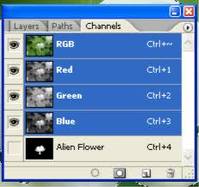
The alpha channel is an additional channel that can be added to images. It contains transparency information about the image, and depending on the type of alpha it can contain various levels of transparency. The alpha channel basically controls the transparency of all the other channels. By adding the alpha channel to an image you control the transparency of the red channel, green channel and the blue channel.
There are two types of alpha channels, pre-multiplied alpha and straight alpha.


Ÿ  Pre-multiplied Alpha (used by Photoshop)

Ÿ  Straight Alpha

The biggest benefit of using alpha channels is visual appeal. Without alpha channels images layered over one another would not be anti-aliased, and therefore, would have a blocky jagged edge to them, which is not attractive. Another benefit of alpha channels is speed. When you save an image with the alpha channel all of the opacity levels are saved with it. You can then place that image over anything you like and the image will still maintain its appearance. This saves time because you can place the image directly over a background without the need to save that image in exactly the right spot over that exact background.
What masking and layers in Photoshop and video is images or videos put on top of each others. In Photoshop you would have only one photo which you would need to edit, to make that work look better you add layers such as other pictures of elements put onto the photo to make it look like it was took with the photo. With videos its more or like having effects on the video such as transitions which you put on the video. Masking is just having shadows on the photo to make it look realistic. 

Formats:

EPS format which stands for Encapsulated PostScript are a special kind of PostScript file, restricted to describing a single page. The characteristics of EPS is its 2D, ASCII (although they can sometimes be set up to include binary data!), Colours or Black and White, no compression, Based on vectors rather than bit map and contain 1 image only (this is the main fact distinguishing an EPS file from a regular PS file!).

PNG files can does a good job on showing both line graphics and bit-mapped graphics. Most web browsers support the PNG format, which makes it easy to include pictures directly in a web page. What the PNG has is binary, it has colour( 24 bit), its 2D, it loss less compression and only has 1 image. 

The TIFF file format is different in that it allows for a flexible set of information fields. The TIFF specification defines a framework for an image header called 'IFD'  that is essentially a flexible set of specifically those tags that the TIFF writer software wishes to specify. The clear benefit of this scheme is that almost any information can accompany an image, while little information is absolutely needed, and image headers remain as lean as possible. TIFF defines support for multiple images in a single file.

The format uses 32bit offsets.

 JPEG is the right format for those photo images which must be very small files, for example, for web sites or for email. JPG is often used on digital camera memory cards, but RAW or TIF format may be offered too, to avoid it. What JPEG has is binary, colours ( 24 bit, which 8 bits each are of RGB, its 2D, lossy compression and only has Image.

The GIF format is one of the most popular formats on the Internet. Not only is the format excellent at compressing areas of images with large areas of the same colour, but it is also the only option for putting animation online. What GIF has is Binary, colours ( but no more then 256 colours which are from a palette), its 2D, lossless compression and it can have multiple images.

The BMP which is bitmap pixels have about 24 bits of colour and its not multiple images. BMP is a standard file format for computers running the Windows operating system. The term “device independent” means that the bitmap specifies pixel colour in a form independent of the method used by a display to represent colour.

PSD is a file format used to create and edit images in Adobe Photoshop. It is a widely accepted format as it supports all available image types – Bitmap, RGB, Duotone, Grayscale, Indexed Colour, CMYK, Lab, and Multichannel. The best thing about Psd format is it can save images in layers. In other words, the image may be opened with Adobe Photoshop anytime at a later date and each individual layer, or part, may be adjusted and edited independently to achieve better effects. Special blending effects may also be achieved using the transparency mask of Photoshop. The maximum size of a PSD file is 30,000x30,000 pixels and may be saved with 16 bits per colour channel.

Ai format is a vector graphics editing program which is native to adobe illustrator and is used to store adobe illustrator drawings. AI file is limited to a much smaller number of drawing commands and it contains no programming logic at all.

The SWF file format was designed as a very efficient delivery format and not as a format for exchanging graphics between graphics editors. The format is primarily intended for on-screen display and so it supports anti-aliasing, fast rendering to a bitmap of any colour format, animation and interactive buttons. Files work well on limited hardware, while taking advantage of more expensive hardware when it is available. The files are designed to be rendered at a high quality very quickly. The following document describes the file format in detail. A character has a 16-bit numeric name. Every character in a file must have a unique name.
Lossless and lossy compression are terms that describe whether or not ,in the compression of a file, all original data can be recovered when the file is uncompressed. With lossless compression, every single bit of data that was originally in the file remains after the file is uncompressed. All of the information is completely restored. This is generally the technique of choice for text or spread sheet files, where losing words or financial data could pose a problem. on the other hand, lossy compression reduces a file by permanently eliminating certain information, especially redundant information. When the file is uncompressed, only a part of the original information is still there (although the user may not notice it). Lossy compression is generally used for video and sound, where a certain amount of information loss will not be detected by most users. The JPEG image file, commonly used for photographs and other complex still images on the Web, is an image that has lossy compression. Using JPEG compression, the creator can decide how much loss to introduce and make a trade-off between file size and image quality.
Ebay :
Ebay , (2009) ,eBAY INC. REPORTS FOURTH QUARTER AND FULL YEAR 2009 RESULTS
http://files.shareholder.com/downloads/ebay/867139445x0x345224/b455630d-4bb9-4ba5-adb1-40dcf29e82ce/eBay_Q409EarningsRelease.pdf
http://www.happynews.com/living/online/history-ebay.htm
Date of accessed : 22/09/2010

you tube:
Jefferson Graham , USA today, ( 21/11/2005 9:35pm) video websites pop up, invite postings.
http://www.usatoday.com/tech/news/techinnovations/2005-11-21-video-websites_x.htm
Date of accessed : 22/09/2010

Playstation :
Rob Fahey , ( 27 April, 2007) , Farewell, father
http://www.eurogamer.net/articles/farewell-father-article
Date of accessed : 22/09/2010

Vector and bitmap :
Sue Chastain ,  Vector and bitmap images two types of 2D graphics
http://graphicssoft.about.com/od/aboutgraphics/a/bitmapvector.htm
Date of accessed : 22/09/2010

Vector and bitmap photo:
http://en.wikipedia.org/wiki/File:VectorBitmapExample.svg
Date of accessed : 22/09/2010

Raster image:
Jay Busselle, Director of Business Development, Digital Art Solutions,
Raster images versus vector images,
http://www.signindustry.com/computers/articles/2004-11-30-DASvector_v_raster.php3
Date of accessed : 28/09/2010

Anti- aliasing :
Ant- aliasing , http://www.pantherproducts.co.uk/Articles/Graphics/anti_aliasing2.shtml
Date of accessed : 28/09/2010

Photo of anti - aliasing and aliasing:
http://www.google.co.uk/imgres?imgurl=http://upload.wikimedia.org/wikipedia/commons/a/ae/Anti-aliasing.jpg&imgrefurl=http://commons.wikimedia.org/wiki/File:Anti-aliasing.jpg&usg=__TDGT1-Oc4I2hnseZ14ceyorOBn8=&h=429&w=300&sz=12&hl=en&start=0&zoom=1&tbnid=k3SVhZOEfO3omM:&tbnh=109&tbnw=76&prev=/images%3Fq%3Daliasing%26um%3D1%26hl%3Den%26sa%3DN%26rlz%3D1R2ADFA_enGB371%26biw%3D1003%26bih%3D482%26tbs%3Disch:1&um=1&itbs=1&iact=rc&dur=47&ei=TWGiTKCpN4qHswbnkqSKBQ&oei=TWGiTKCpN4qHswbnkqSKBQ&esq=1&page=1&ndsp=16&ved=1t:429,r:1,s:0&tx=53&ty=34
Date of accessed : 28/09/2010

Colour space :
http://www.pcl.co.nz/Info/Glossary.html
Date of accessed : 29/09/2010

The photo for colour space :
http://www.google.co.uk/imgres?imgurl=http://www.colblindor.com/wp-content/images/CIE%25201931%2520color%2520space.png&imgrefurl=http://www.colblindor.com/2007/01/18/cie-1931-color-space/&usg=__3H9uTVzfsw6QmN1kWSki_1Ip1Sw=&h=359&w=325&sz=55&hl=en&start=0&zoom=1&tbnid=Off9DsAU2jLf3M:&tbnh=105&tbnw=97&prev=/images%3Fq%3DColour%2Bspace%26um%3D1%26hl%3Den%26safe%3Dactive%26biw%3D1020%26bih%3D592%26tbs%3Disch:1&um=1&itbs=1&iact=rc&dur=64&ei=ofaiTNeMI8qMOPOZgYQD&oei=ofaiTNeMI8qMOPOZgYQD&esq=1&page=1&ndsp=19&ved=1t:429,r:2,s:0&tx=64&ty=93
Date of accessed : 29/09

Bit depth :
http://en.wikipedia.org/wiki/Color_depth
Date of accessed : 29/09/2010

PNG Portable Network Graphics:
http://www.mywebsite.force9.co.uk/png/
Date of accessed : 29/09/2010
 
JPEG :
http://people.sc.fsu.edu/~jburkardt/data/jpg/jpg.html
Date of accessed : 29/09/2010

GIFS:
Matt Mickiewicz and Nicky Danino, (December 26th, 1999)
http://articles.sitepoint.com/article/gif-jpg-png-whats-difference
Date of accessed: 29/09/2010

Alpha channels info:
Using Alpha Channel to Blend Image on a Background Smoothly
http://www.icongalore.com/xp-icon-articles/alpha-channel-explained.htm
Date of accessed : 04/10/2010

Eps format:
The EPS file format, (03/02/2010)
http://www.prepressure.com/library/file-formats/eps
Date of accessed : -4/10/10

IFF:
Tag Image File Format
http://www.awaresystems.be/imaging/tiff/faq.html
Date of accessed : 4/10/10

PSD:
Adobe Photoshop File Format Summary
http://www.fileformat.info/format/psd/egff.htm
Date of accessed : 06/10/10

AI:
http://en.wikipedia.org/wiki/Adobe_Illustrator_Artwork
Date of accessed : 06/10/10